2024. 5. 29. 12:39ㆍ웹개발
네이버로 이메일 인증을 구현해봤습니다.
[프로젝트] 네이버 메일 링크 클릭으로 인증 구현(SpringBoot)
개요 SpringBoot 프로젝트에서 메일 인증을 네이버 SMTP 이용해서 구현한다. 따로 인증 코드를 입력하지 않고 인증 링크를 클릭하면 메일 인증 되는 방식으로 진행하였다. 흐름은 다음과 같다. - 회
breakthedays.tistory.com
JavaMailSender란 녀석을 만났다.
프로젝트 진행 중 메일 전송 로직을 개발 해야만 했다. 문자 서비스, 알림톡 서비스와는 다르게 메일 서비스는 무료로 사용 할 수 있는 거 같다. (이메일을 보내는데 우리가 비용을 지불하지 않
thecardeveloper.tistory.com
※ 봐주시면 큰 도움이 됩니다. 😄😄
큰 흐름은 회원가입 시 중복된 이메일 사용 방지 및 인증번호를 통해서 확실한 신원의 사용자만 가입하게 만들었다. 만약 이메일 인증이 없다면 무작위적으로 이메일을 생성하면 보안과 도용 측에서 문제가 생길 것 같다. 그래서 네이버 메일에 인증번호를 받아와 회원가입 페이지에 입력하면 인증하는 형식으로 구현해보았다.
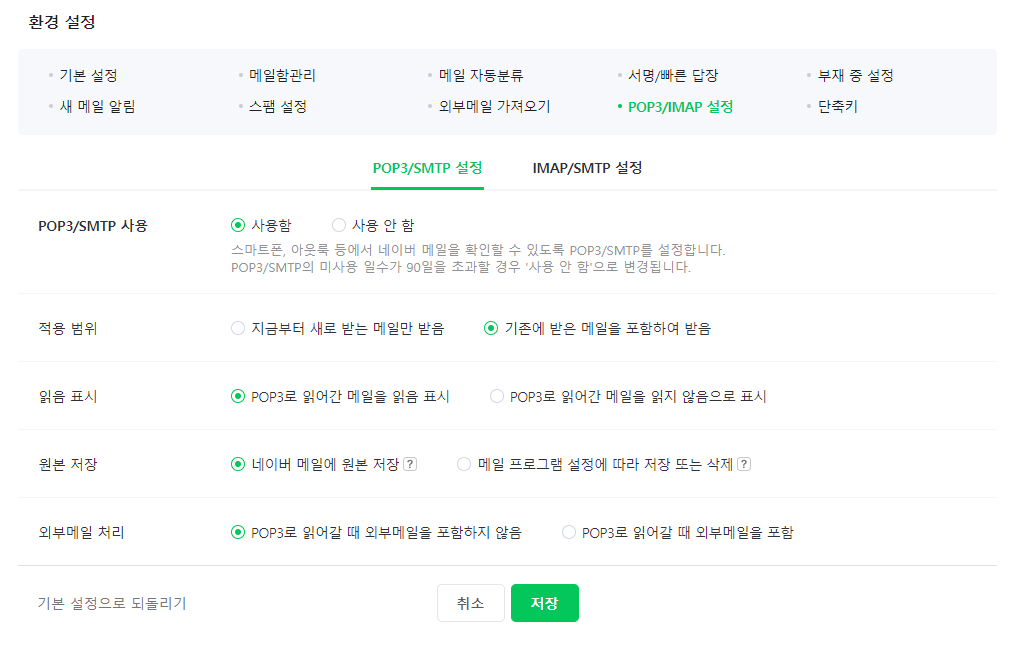
네이버 메일 환경설정에서 위와 같이 설정해주고 그 밑에 메일 프로그램 환경 설정 안내 를 참고하여 MailCheckConfig에 입력해줍니다.
<application.properties>
spring.mail.username=발송할 이메일
spring.mail.password=발송할 이메일 비밀번호
<MailCheckConfig>
import lombok.Getter;
import lombok.Setter;
import lombok.ToString;
import org.springframework.beans.factory.annotation.Value;
import org.springframework.boot.context.properties.ConfigurationProperties;
import org.springframework.context.annotation.Bean;
import org.springframework.context.annotation.Configuration;
import org.springframework.context.annotation.PropertySource;
import org.springframework.mail.javamail.JavaMailSender;
import org.springframework.mail.javamail.JavaMailSenderImpl;

import java.util.Properties;

@Configuration
@Getter
@Setter
@ToString
public class MailCheckConfig {

    @Value("${spring.mail.username}")
    private String username;

    @Value("${spring.mail.password}")
    private String password;

    @Bean
    public JavaMailSender javaMailService() {
        JavaMailSenderImpl javaMailSender = new JavaMailSenderImpl();

        javaMailSender.setHost("smtp.naver.com"); //메인 도메인 서버 주소 => 정확히는 smtp 서버 주소
        javaMailSender.setUsername(username); //네이버 아이디
        javaMailSender.setPassword(password); //비밀번호
        javaMailSender.setPort(000); //메일 인증서버 포트
        javaMailSender.setJavaMailProperties(getMailProperties()); //메일 인증서버 정보 가져오기

        return javaMailSender;
    }

    private Properties getMailProperties() {
        Properties properties = new Properties();
        properties.setProperty("mail.transport.protocol", "smtp"); //프로토콜 설정
        properties.setProperty("mail.smtp.auth", "true"); // smtp 인증
        properties.setProperty("mail.smtp.starttls.enable", "true"); // smtp strattles 사용
        properties.setProperty("mail.debug", "true"); // 디버그 사용
        properties.setProperty("mail.smtp.ssl.trust","smtp.naver.com"); // ssl 인증 서버는 smtp.naver.com
        properties.setProperty("mail.smtp.ssl.enable","true"); // ssl 사용
        return properties;
    }
}
<UserCheckDTO>
import lombok.Data;
import lombok.Getter;
import lombok.Setter;

import java.util.Map;

public class UserCheckDTO {

   ...

   	// 이메일 인증에 사용할 DTO
    @Getter
    public static class FindByEmail {
        private String email;					//회원가입 할 이메일
        private String certificationNumber;		//이메일 인증번호
    }

    ...
}
<EmailCertification>
import lombok.RequiredArgsConstructor;
import org.springframework.data.redis.core.StringRedisTemplate;
import org.springframework.stereotype.Repository;

import java.time.Duration;

@RequiredArgsConstructor
@Repository
public class EmailCertification {

    private final String PREFIX = "email:";     //key 값이 중복되지 않도록 상수 선언

    private final int LIMIT_TIME = 3*60;		//redis에 저장할 시간

    private final StringRedisTemplate stringRedisTemplate;

    //Redis에 저장
    public void createEmailCertification(String email, String emailNumber) {
        stringRedisTemplate.opsForValue()
                .set(PREFIX + email, emailNumber, Duration.ofSeconds(LIMIT_TIME));
    }

    //이메일에 해당하는 인증번호 불러오기
    public String getEmailCertification(String email) {return stringRedisTemplate.opsForValue().get(PREFIX + email);}

    //인증 완료 시, 인증번호 Redis에서 삭제
    public void deleteEmailCertification(String email) {stringRedisTemplate.delete(PREFIX + email);}

    //Redis에 해당 이메일에 저장된 인증번호 존재 확인
    public boolean hasKey(String email) {return stringRedisTemplate.hasKey(PREFIX + email);}

}
앞서 작성했던 전화번호 인증에 사용했던 방식처럼 Redis에 'email:example@naver.com' 키 값에 인증번호를 값으로 3분동안 저장했습니다.
<UserCheckService>
import lombok.RequiredArgsConstructor;
import org.springframework.beans.factory.annotation.Autowired;
import org.springframework.beans.factory.annotation.Value;
import org.springframework.mail.javamail.JavaMailSender;
import org.springframework.mail.javamail.MimeMessageHelper;
import org.springframework.stereotype.Service;
import org.springframework.transaction.annotation.Transactional;
import com.example.enlaco.Exceptions.CustomExceptions;
import org.springframework.web.bind.annotation.RequestBody;

import javax.mail.Message;
import javax.mail.internet.InternetAddress;
import javax.mail.internet.MimeMessage;
import java.util.Optional;


@Service
@RequiredArgsConstructor
public class UserCheckService implements UserCheck{

    private final SmsUtil smsUtil;
    private final SmsCertification smsCertification;
    private final EmailCertification emailCertification;
    private final UsersRepository usersRepository;
    private final JavaMailSender javaMailSender;

    @Value("${spring.mail.username}")
    private String emailSender;

    //가입된 이메일이 있는지 검증
    public boolean findUserByEmail(@RequestBody UserCheckDTO.FindByEmail requestDTO) throws Exception {
        String email = requestDTO.getEmail();
        Optional<UsersEntity> userOptional = usersRepository.findByEmail(email);

        if (userOptional.isPresent()) {
            return true; //회원가입 된 이메일이 있으면
        } else {
            return false; //이메일이 없으면
        }
    }

    @Transactional
    public void sendEamil(UserCheckDTO.FindByEmail requestDTO) throws Exception {
        MimeMessage message = javaMailSender.createMimeMessage();
        MimeMessageHelper helper = new MimeMessageHelper(message, true, "UTF-8");
        String emailNumber = emailNumber(requestDTO);

        message.addRecipients(Message.RecipientType.TO, requestDTO.getEmail());
        message.setSubject("모해먹 회원가입 인증");      //메일 제목

        String body = "<div>"
                + "<h1> 안녕하세요. 모해먹 입니다</h1>"
                + "<br>"
                + "<p>아래 인증번호를 입력해 주세요.<p>"
                //+ "<a href='http://localhost:8080/certification/certifiedEmail'>인증 링크</a>"
                + "<h2>" + emailNumber + "</h2>"
                + "</div>";

        message.setText(body, "utf-8", "html");  //내용, charset 타입, subtype
        //보내는 사람의 이메일 주소, 보내는 사람 이름
        message.setFrom(new InternetAddress(emailSender, "모해먹 관리자")); //보내는 사람
        javaMailSender.send(message);   //메일 전송

    }

	//이메일 인증번호 생성
    @Transactional(readOnly = true)
    public String emailNumber(UserCheckDTO.FindByEmail requestDTO)  {
        String email = requestDTO.getEmail();

        int randomNumber = (int) (Math.random()*900000) + 100000;
        String emailNumber = String.valueOf(randomNumber);

        System.out.println("Sending SMS to: " + email + " with code: " + emailNumber);

        //Redis에 이메일 키 값으로 인증번호 저장
        emailCertification.createEmailCertification(email, emailNumber);

        return emailNumber;
    }

    //이메일 검증
    public boolean isVerifyEmail(UserCheckDTO.FindByEmail requestDTO) {
        String formCertificationNumber = requestDTO.getCertificationNumber();

        //redis 인증번호와 폼에서 보낸 인증번호가 일치할 때 true && redis 데이터 삭제
        if (formCertificationNumber.equals(emailCertification.getEmailCertification(requestDTO.getEmail()))) {
            emailCertification.deleteEmailCertification(requestDTO.getEmail());
            return true;
        }

        return false;
    }
}
<CertificationController>
import lombok.RequiredArgsConstructor;
import org.springframework.http.HttpStatus;
import org.springframework.http.ResponseEntity;
import org.springframework.security.core.parameters.P;
import org.springframework.web.bind.annotation.*;
import com.example.enlaco.Exceptions.CustomExceptions;

import javax.servlet.http.HttpServletRequest;


@RestController
@RequiredArgsConstructor
@RequestMapping("/certification")
public class CertificationController extends BaseController{

    private final UserCheckService userCheckService;
    private final UserCheck userCheck;

	//회원가입 된 이메일이 있는지
    @PostMapping("/validEmail")
    public ResponseEntity<?> ValidsEmail(@RequestBody UserCheckDTO.FindByEmail requestDTO) throws Exception {
        try {
            if (!userCheckService.findUserByEmail(requestDTO)) { //회원가입 된 이메일이 존재하지 않으면
                return new ResponseEntity(DefaultRes.res(StatusCode.OK, ResponseMessage.Email_NotExist), HttpStatus.OK);
            } else {
                return new ResponseEntity(DefaultRes.res(StatusCode.BAD_REQUEST, ResponseMessage.Email_Exist), HttpStatus.BAD_REQUEST);
            }
        } catch (CustomExceptions.Exception e) {
            return handleApiException(e, HttpStatus.BAD_REQUEST);
        }
    }

    //이메일 전송
    @PostMapping("/sendEmail")
    public ResponseEntity<?> EmailSend(@RequestBody UserCheckDTO.FindByEmail requestDTO) throws Exception {
        try {
            userCheckService.sendEamil(requestDTO);         //인증 메일 발송
            return new ResponseEntity(DefaultRes.res(StatusCode.OK, ResponseMessage.Email_NotExist), HttpStatus.OK);
        } catch (CustomExceptions.Exception e) {
            return new ResponseEntity(DefaultRes.res(StatusCode.INTERNAL_SERVER_ERROR, "인증 메일 발송 중 오류"), HttpStatus.INTERNAL_SERVER_ERROR); // 인증 메일 발송 중 오류 발생
        }
    }

    //이메일 인증
    @PostMapping("/confirmEmail")
    public ResponseEntity<?> confirmEmail(@RequestBody UserCheckDTO.FindByEmail requestDTO) throws Exception {
        try {
            if(userCheckService.isVerifyEmail(requestDTO)) {
                return new ResponseEntity(DefaultRes.res(StatusCode.OK, ResponseMessage.Email_CERT_SUCCESS), HttpStatus.OK);
            } else {
                return new ResponseEntity(DefaultRes.res(StatusCode.BAD_REQUEST, ResponseMessage.Email_CERT_FAILED), HttpStatus.BAD_REQUEST);
            }
        } catch (CustomExceptions.Exception e) {
            return handleApiException(e, HttpStatus.BAD_REQUEST);
        }
    }
}
이어서 html로 확인해 보겠습니다.
스프링부트) 회원가입 네이버 이메일 인증 2
이어서 html로 확인 해보겠습니다. 이메일 이메일 인증 검사 //이메일 형식 확인하는 함수function validateEmail(email) { const emailRegex = /^[a-zA-Z0-9._%+-]+@[a-zA-Z0-9.-]+\.[a-zA-Z]{2,}$/; return emailRegex.test(email);}a
studydogyu.tistory.com
※ 피드백 환영합니다.
'웹개발' 카테고리의 다른 글
| 스프링부트) 타임리프 + 자바스크립트 (0) | 2024.06.10 |
|---|---|
| 스프링부트) 회원가입 네이버 이메일 인증 2 (0) | 2024.05.29 |
| 스프링부트) 회원가입 번호인증(2) (0) | 2024.05.23 |
| 스프링부트) 회원가입 번호인증(1) (0) | 2024.05.23 |
| 스프링부트) 회원가입 시 우편번호 검색 (0) | 2024.05.13 |